Shopify SEO is standard SEO applied to how Shopify organises your catalogue. Collection pages are the category hubs of your store.
Google needs clear signals about what those pages contain and how they connect to your products before it can send buyers to them. When those signals are weak, the pages sit quietly in the middle of the search results and your ad spend picks up the slack.
Most stores don’t lose visibility because they lack products. They lose it because their collection pages list items without answering the specific searches real buyers type.
Thin category copy, duplicate URLs from filters and tags, and missing internal links all quietly limit how much of that long-tail demand, the specific, detailed searches people actually type, a page can capture. Effective ecommerce SEO marketing addresses all three.
If you’re trying to work out why your collection pages aren’t doing more work in Google, this is the right place to start.
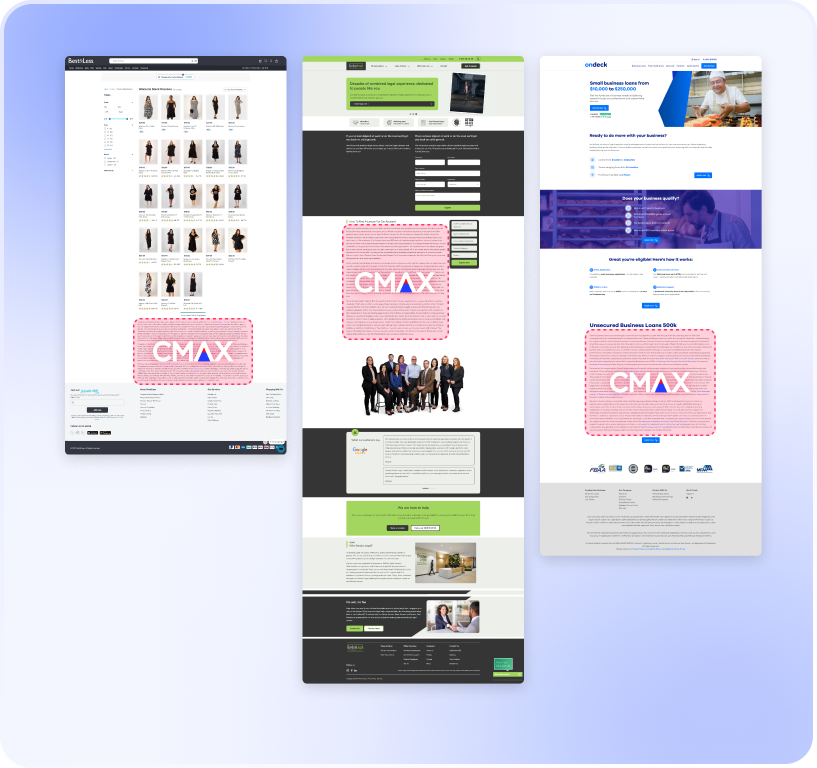
CMAX’s approach to shopify SEO services focuses on building out collection page content and internal linking so those pages can answer more of the searches already happening.
Shopify SEO Helps Your Store’s Collection Pages Get Discovered More Reliably
Shopify automatically generates sitemap files when you add a product, collection, page, image, or blog post. That handles discovery in principle.
The real work is making sure the pages Google finds are worth ranking, with descriptive titles, useful copy, and internal links that clarify each product’s place in the catalogueue. Strong ecommerce product SEO starts there.
SEO for Shopify Catalogueues
Shopify collections function like category pages in a department store, so they need clear titles, descriptive copy, and internal links that help Google read the relationship between category, subcategory, and product. Google says links help it determine page relevance and find new pages to crawl.
Collection pages perform better when they are linked from navigation, related guides, and product-adjacent content that already earns attention. This is true whether you manage SEO in-house, work with an ecommerce SEO agency, or use a platform like CMAX.
Long-Tail Demand Drives Visibility
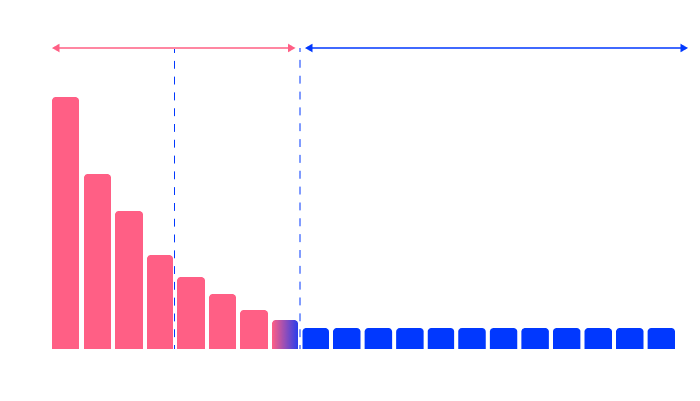
Broad category terms matter, but a gemini SEO service also benefits from collection pages that address detailed questions about use case, material, fit, size, brand compatibility, and comparison. Over 90% of search and AI demand is in the long tail.
Stores grow visibility by covering many specific searches rather than depending on a few obvious terms alone. Short-lived shopify SEO tricks don’t change that maths.
SEO for ecommerce stores is built on the same principle: cover the full range of what buyers actually type, not just what looks obvious on a category page.
Stronger Visibility Starts With Crawlability and Duplicate-Content Control
Here is the part most agencies skip past in the monthly report. Shopify’s default URL structure, the one it sets up automatically, is upstream of everything else in your SEO.
That means platform defaults determine whether your pages are ever properly indexed by Google before a single word of copy is written or a single link is built.
Think of it like a street directory with missing pages. A buyer who looks up your category finds nothing listed, so they turn to a competitor instead.
Correcting those missing entries at the source fixes the problem for every future lookup. Controlling Shopify’s URL structure works the same way: get the defaults right at the platform level, and Google’s index of your pages is clean from the start rather than patched up later.
An ecommerce SEO audit finds which low-value URLs are consuming crawl budget, which is Google’s term for how often its software comes back to read your site, before CMAX scopes implementation through a three-day Analytics and Search Console review. Search Console is Google’s free tool showing which searches your site appears for.
Make Key Pages Easier to Crawl
New collections buried deep in your site or starved of internal links get found slowly. The fix is straightforward: link those URLs from places users actually reach.
Control Duplicate Shopify URL Paths
Filters, tags, variants, and tracking parameters can produce multiple paths to near-identical content. Consistent canonicals let shopify SEO consolidate ranking signals from filtered, tagged, and parameterised paths onto the preferred collection URL.
Google sees one strong page instead of several weak ones.
CMAX Connects Related Pages at Scale
A shopify plus SEO agency may coordinate manual content updates. CMAX generates controlled output from human-reviewed, client-approved content.
Its Dynamic Internal Linking and Full Body SEO approach also support Gemini SEO by creating clearer connections between each collection and the detailed information around it. Google uses internal links and anchor text to gauge page relevance and discover new URLs across the site.
Collection Pages Grow When They Answer More Specific Searches
A collection page that lists products and repeats a generic intro gives Google little to work with: no use case, no buyer intent, no reason to rank it above a competitor who answered the question properly. Useful ecommerce SEO tips address concrete modifiers such as occasion, finish, compatibility, audience, and feature, rather than relying on generic category copy.
The same applies to specialised verticals: SEO for healthcare depends on the same depth of modifier coverage for its collection equivalents.
Unlike one-off category copy, shopify SEO treats each collection as a living asset that expands coverage, sharpens internal connections, and stays current as demand shifts. Ecommerce SEO best practices use these as the practical tools.
Add Depth Beyond Thin Category Copy
Thin copy misses the modifiers that determine whether a collection page answers a shopper’s specific need. The question is how to improve shopify SEO at the copy level: write to the buyer’s actual question, not to the product name.
Use Search Console to Find Gaps
Search Console impressions, clicks, and position by query show which collection pages surface for relevant searches but aren’t winning clicks. The URL Inspection tool adds crawl and index data, so you can tell whether weak performance is a content gap, a discovery problem, or both.
Keep Collections Fresh With an Agentic Approach
Search demand shifts. New products arrive, seasonal intent changes, and emerging modifiers appear.
Collection pages need ongoing updates, not one-off attention. CMAX is the Agentic SEO Platform, targeting the vast majority of search demand in the long tail to support broader coverage and continuous freshness.
Shopify store speed optimisation matters here too: a slow collection page that ranks still loses the click. The best shopify SEO apps address individual problems in isolation; CMAX connects content, linking, and speed signals into a single managed programme.
Frequently Asked Questions
Will Switching Shopify Themes Hurt My SEO?
A theme change does not automatically damage SEO, but it can affect title tags, H1s, internal linking patterns, structured content output, and page rendering if the new theme or its apps alter the underlying code. Shopify says Online Store 2.0 themes should include a valid title tag and H1 by default, and advises using inspection tools to verify what search engines actually render after changes.
Treat a theme migration as a technical SEO event, not a design event, and audit what changed before and after.
The same technical care applies in SEO for banks, where template changes can alter headings, internal links, structured content, and rendered page elements.
Should I Have a Blog on My Shopify Store?
A blog earns its place when it answers the informational searches buyers run before purchasing: comparisons, care guidance, compatibility, use-case questions. Shopify says its built-in blogging engine can improve SEO, build your audience, and generate more sales.
The condition is that blog articles are connected to relevant collection pages through internal links. Content that floats without links doesn’t transfer any authority to the pages you want to rank.
How Long Does Shopify SEO Take to Show Results?
There is no fixed timeline. Results depend on the site’s starting point, the competition, existing content coverage, and whether technical blockers are limiting discovery and indexing.
Shopify says Google indexes content within 48 to 72 hours after it is added or updated, but indexing is not ranking, and Google does not index every page on every site. Most SEO programmes run by conventional agencies, using outdated methods, tell clients to expect results in six months.
CMAX’s methods allow clients to start seeing clicks in 6 to 8 weeks.
Timelines also vary by sector. SEO for financial services can involve additional content approval and compliance steps before updates are published.
Shopify SEO Starts With Stronger Collection Pages
Shopify SEO works best when collection pages do more than list products. They need enough useful copy, clear internal links, and supporting content to help Google connect categories, subcategories, and product pages.
That is what determines whether your catalogueue is indexed properly or partially invisible.
CMAX approaches enterprise ecommerce SEO by expanding coverage across use case, fit, material, compatibility, and other long-tail buying details. For collection-led ecommerce, SEO for retailers means expanding the content surface area around key categories and keeping those pages fresh and connected over time.
The result is broader search and AI visibility, without depending on a handful of obvious terms alone.
The clearest next step is to find out where your catalogueue has gaps. That is what the Missing Customer Map review is designed to show you.
If you’re curious as to how you’re performing on AI, book in a Missing Customer Map review with our Growth Team.
Author
Jeremy Tang
Founder and CEO of CMAX
Jeremy Tang is the Founder and CEO of CMAX. With over 2 decades of experience in business consulting and digital marketing, he has successfully driven seven startup businesses, six of which achieved $1 million in revenue from zero in less than 16 months, 5 of which grew to multi-million dollar a year ventures without any external funding. Jeremy's expertise lies in streamlining business processes through technology and leveraging digital (in particular SEO) for business growth. He resides in Australia, travels extensively, and draws inspiration from his global experiences.